Showing posts with label ipad. Show all posts

Thursday, 11 October 2012

My Take on Windows 8

Windows 8: the new logo

Microsoft is putting the finishing touches on their 8th edition of the market-dominating Windows operating system. Although, this is arguably one of the most drastic overhauls of the operating system since first launch in the mid-90s. Microsoft is gearing Windows more towards touch screen devices - tablets, phones, touchscreen PCs - and the changes as a result of this are quite profound. 

Live Tiles are definitely a useful and intuitive tool with the countless notifications that one gets on a daily basis. The idea behind them its that each app has it's own tile, which displays the current status of that particular app. For example: the Facebook app would display the number of new messages, notifications, and friend requests on the tile itself, without the user having to open the app. Good idea, sure. But many have questioned Metro's (as Microsoft has colloquially called it) ability to successfully transfer over to the personal computer. I'll talk more about that later. 

Windows 8 Start Screen: replacing the Start Menu

The Start Screen is essentially a collection of live tiles, offering notifications from many different apps all in one place, much like Notification Centre in Apple's iOS and OS X. Microsoft has taken a very different approach to this, however. Rather than having a Start Menu, or Launchpad (like previous editions of Windows and current OS X versions), Microsoft has made the Notification Centre the only place to access applications, and other features that are part of the computer. Personally, I think this is a fantastic idea. Unfortunately, rather than only making this available for those using tablets, Microsoft has pushed this rather intuitive feature on to everyone using Windows 8. Not a bad idea, you might ask? Perhaps. However, with devices without touch screens (or 90% of the personal computer market (when I say computer, I mean notebook and desktop PCs, not iPads and tablets)), this installation does not work as one would desire. 

The Hot Corner to open the Start Screen


The Hot Corner-esque aspects of the OS make it difficult for users with keyboards and mice to navigate the system, with no constant markings on the screen as to how to get to the Start Screen, the user becomes confused, frustrated, and immediately dislikes the change. On tablets, it's a completely different story, with the user swiping from any side of the screen to get to these features, it definitely makes the OS seem responsive and like it was actually designed for touch screens. Which it was. It's just that the (forced) transition for notebook and desktop users seems like they've been given a unfinished and inadequate experience. 

Windows 8 Application Store


The Microsoft Application Store is a long overdue addition to Windows 8. Gone are the days where users had to search the internet for what they wanted, only to find thousands of matches, most of which was malware. The Application Store currently has about 4000 apps (that's before the actual launch of Windows 8). It's very similar to Apple's OS X App Store; every app needs to be verified by Microsoft, to ensure it has only good intent. Updates are easy, fast, and quite regular. 

Overall, Windows 8 is a wonder on tablets and other all-touchscreen devices. It's use on notebooks and desktops seems rather lacklustre and poorly implemented. Having said that, only the launch, sales figures and user satisfaction numbers can prove that point. It will be just as interesting to see the success of the Microsoft Surface. Without any solid reviews to base any critique this device on, it's made to look like it's the most amazing thing since the advent of the internet, which is exactly what Microsoft wants us to think. Having said that, it sure does look nice.

Microsoft's new tablet, dubbed the Microsoft Surface

Monday, 1 October 2012

iOS6 Maps: they're not THAT bad

For quite some time now, I've been using iOS6; over all, it's a slight improvement on iOS5. It's not a big change, but there are a few new features I've come to use everyday. It's fast, looks great on iPhone 5 and certainly makes a great mobile operating system. 

But, there's one thing about it that everyone is talking about more than everything else:

Maps

It's interesting that Maps on mobile devices has become one of the most important features of any phone. Even more interesting is the fact that including Maps on the first iPhone was a last-minute decision (http://9to5mac.com/2012/09/28/including-maps-on-the-original-iphone-was-a-last-minute-decision/). 

Apple's new maps are iOS6 exclusive, and offer some new features that haven't been seen on iOS before: namely, turn-by-turn navigation, flyover, and Yelp integration. 

These maps excel where most maps don't: they look great! Unfortunately, where maps need to excel - accuracy, and reliability - Apple fails: sometimes tremendously. The use of vector based graphics make imagery fast, pleasant to look at, and they consume far less data than other mapping services. However, accuracy leaves a lot to be desired. Some people have noted that their home is in the middle of a river, or their closest cafe is in New York (for someone living in Sydney, it's not that useful). Something adding irony to the arena of criticism is the location of Apple's flagship Sydney store:
The apparent location ofApple's Sydney Store (the purple pin is the actual location)
Flyover
I've spent a lot of time visiting many cities around the world with Flyover. It's obvious that Apple has spent a lot of time and effort on these 3D maps of hundreds of cities around the world. Here's a few good screenshots:


CBD, Sydney
Empire State Building, New York
Houses of Parliament, London 
CBD, Sydney
One that isn't so great:
Western Distributor, Sydney

Turn-byTurn Navigation
It has been reported that the reason Apple ditched Google Maps was that Google refused to make turn-by-turn navigation available to Apple. Apple's version seems to work well. Other than directing me down the wrong way of a one-way street, I haven't had any problems with it.
Directions from Sydney to Chatswood.
Yelp Integration
It's nice to see local businesses on these maps, and their contact cards flow nicely; providing reviews, photos, and contact methods, all unified into one place. 
A contact card for a local cafe
Conclusion 
In the end, Apple has made a genuine attempt to make a beautiful, accurate mapping service, in some cases, they succeed; in others, they don't. 

Personally, I think that for a first attempt, Apple has done an authentic job. With a lot of work and effort, Apple can once again call these maps the most beautiful, powerful mapping service ever.


Before and after the Maps disaster


Tuesday, 25 September 2012

5 Days With iPhone 5

Hi everyone, Jack here;

Today marks my fifth day with Apple's newest product to hit the market. Personally, I think five days is more than enough time to make my assumptions and decide if those hours waiting in line were worth it or not. 

Apple's new iPhone 5 in black & slate and white & silver (image credit: Apple.com)

So firstly, some history. For the three years leading up to Friday the 21st of September 2012, I had been using an iPhone 3GS. It had done me very well for those three years: but I was well overdue for an upgrade. The front and back panels were falling apart, the battery rarely lasted more than two hours, it took almost a minute to open Safari (or any app, for that matter), the screen was overwhelmingly scratched, and the camera could barely make out the silhouette of an office tower... But amazingly, it still worked!

Understandably, after the setup process with my new iPhone, I was pleasantly relieved when I could use Safari in less than a second. And I use 'pleasantly' as a big understatement.

I'll give the iPhone 5 a rating out of 10 for the following key aspects; setup, display, battery, speed, and software

On with the show:

Setup: 10/10
There's been a lot of people complaining about iCloud and it's myriad of problems: I didn't encounter any. It was as easy as signing in to my Apple ID and tapping 'Backup from iCloud.' It was all done. All my photos, contacts, messages, apps, settings... Everything was just there. 


All your content and settings from a previous iPhone are restored to your new iPhone in these two screens (image credit: About.com)

Display: 9/10
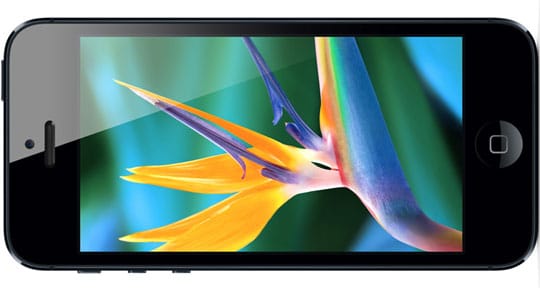
I was amazed with this display, it really looks like the icons are sitting on top of the screen, rather than under it. There's really nothing more to say other than 'wow.' Now, again, I have been witheld from the retina display for the past three years, so perhaps my analysis of this aspect of iPhone 5 is biased; but if you take away something we're all used to now, you'd really notice the difference. After comparing this screen to my 3GS, there really was no competition. 
Apple's Retina Display offers clear, sharp, and precise image and resolutions (image credit: RS Web Solutions)

Battery: 6/10
Unfortunately, I believe the battery is the ultimate downfall of iPhone 5. LTE and all the different system services definitely drain this battery. I can just manage a day on the battery; by the time I go to bed, it's at 5%. 
The battery (I believe) is the ultimate drawback of iPhone 5 (image credit: ultrasn0w.ca)

Speed: 9/10
Just like the display, I am partially biased with this component of iPhone 5; however, even when comparing 5 to 4S, it's possible to feel how much faster it is. LTE is astonishingly fast, so much so that I found myself complaining about the slow network when LTE was unavailable in my location and it fell back to 3G.
LTE (Long Term Evolution) offers super-fast cellular networking with (theoretical) speeds up to 40Mbps (image credit: GottaBeMobile)

Software: 7/10
iOS has proven to be one of Apple's major successes. Released in 2007, it's proven to outperform many other mobile OSs: until recently. It's been over 5 years, and the aesthetics have remained largely unchanged. It's still the same grid of icons (albeit with another row added) and the system apps are the same as they were in 2007. Personally, I think iOS is beginning to show it's age. Other than aging, it's a great OS, the App Store is really the pulling point of iOS and without that, I think it's unlikely that iOS would still be as popular as it is. 
Apple's iOS 6 is available for iPhone, iPad, and iPod touch (image credit: Engadget)


Overall score: 41/50 or 82%

So, to answer the ultimate question: yes, I think it was worth waiting in line for hours to get my hands on one. But Apple had best make the iPhone 6 one amazing phone for me to do it again.

BONUS: iPhone 5's new trailer by Apple: