Showing posts with label Mac. Show all posts

Thursday, 11 October 2012

My Take on Windows 8

Windows 8: the new logo

Microsoft is putting the finishing touches on their 8th edition of the market-dominating Windows operating system. Although, this is arguably one of the most drastic overhauls of the operating system since first launch in the mid-90s. Microsoft is gearing Windows more towards touch screen devices - tablets, phones, touchscreen PCs - and the changes as a result of this are quite profound. 

Live Tiles are definitely a useful and intuitive tool with the countless notifications that one gets on a daily basis. The idea behind them its that each app has it's own tile, which displays the current status of that particular app. For example: the Facebook app would display the number of new messages, notifications, and friend requests on the tile itself, without the user having to open the app. Good idea, sure. But many have questioned Metro's (as Microsoft has colloquially called it) ability to successfully transfer over to the personal computer. I'll talk more about that later. 

Windows 8 Start Screen: replacing the Start Menu

The Start Screen is essentially a collection of live tiles, offering notifications from many different apps all in one place, much like Notification Centre in Apple's iOS and OS X. Microsoft has taken a very different approach to this, however. Rather than having a Start Menu, or Launchpad (like previous editions of Windows and current OS X versions), Microsoft has made the Notification Centre the only place to access applications, and other features that are part of the computer. Personally, I think this is a fantastic idea. Unfortunately, rather than only making this available for those using tablets, Microsoft has pushed this rather intuitive feature on to everyone using Windows 8. Not a bad idea, you might ask? Perhaps. However, with devices without touch screens (or 90% of the personal computer market (when I say computer, I mean notebook and desktop PCs, not iPads and tablets)), this installation does not work as one would desire. 
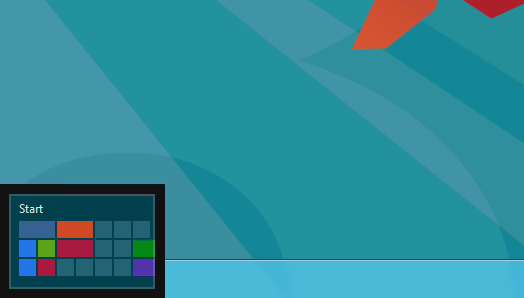
The Hot Corner to open the Start Screen


The Hot Corner-esque aspects of the OS make it difficult for users with keyboards and mice to navigate the system, with no constant markings on the screen as to how to get to the Start Screen, the user becomes confused, frustrated, and immediately dislikes the change. On tablets, it's a completely different story, with the user swiping from any side of the screen to get to these features, it definitely makes the OS seem responsive and like it was actually designed for touch screens. Which it was. It's just that the (forced) transition for notebook and desktop users seems like they've been given a unfinished and inadequate experience. 

Windows 8 Application Store


The Microsoft Application Store is a long overdue addition to Windows 8. Gone are the days where users had to search the internet for what they wanted, only to find thousands of matches, most of which was malware. The Application Store currently has about 4000 apps (that's before the actual launch of Windows 8). It's very similar to Apple's OS X App Store; every app needs to be verified by Microsoft, to ensure it has only good intent. Updates are easy, fast, and quite regular. 

Overall, Windows 8 is a wonder on tablets and other all-touchscreen devices. It's use on notebooks and desktops seems rather lacklustre and poorly implemented. Having said that, only the launch, sales figures and user satisfaction numbers can prove that point. It will be just as interesting to see the success of the Microsoft Surface. Without any solid reviews to base any critique this device on, it's made to look like it's the most amazing thing since the advent of the internet, which is exactly what Microsoft wants us to think. Having said that, it sure does look nice.

Microsoft's new tablet, dubbed the Microsoft Surface

Thursday, 4 October 2012

5 reasons to consider Linux

Linux. You may have heard of it before but wondered "Why should I use it?". Maybe "Eh, Linux sounds a bit complex." Even "What the hell is Linux?" Last week, I gave an overview of Ubuntu 12.10, a distribution of Linux for the desktop. You can read the post here.

Just a small disclaimer, I am not here to preach the promote or campaign Linux. I am not a fanboy of Linux, in fact, I've been extremely critical of Linux since I've been an active user in 2009. I'm just trying to show those who don't know what Linux can do for them and how it differs from commercial operating systems. Now, on to the list.

Linux is free

Pretty straight forward. Linux doesn't cost a dime. Just download the .iso of you're favourite distribution and burn it to a disc or USB. Not to mention, Linux offers free alternatives to many popular commercial software applications (the obvious ones being Libre Office and Gimp, which are alternatives to Microsoft Office and Adobe Photoshop). Many of these applications come right out of the box too.

The new LibreOffice and Gimp (image credit: ZDNet)

Linux is free

No, this is not the same reason as the first. Linux is designed with freedom in mind. Every part of the operating system is customisable For example, in Windows or OSX, you pretty much only have Explorer or the Finder to browse for files and that's it. Ubuntu comes with a file browser called Nautilus. But it's not your only option, in fact, not by far. There also Marlin, Dolphin, Thunar, PCManFM etc. For the hardcore who want to manage EVERYTHING, there's always Arch Linux.

Linux is lightweight

Say for example, you have an old computer. Maybe one that's about 6-7 years old. If you want to run a modern operating like Windows 7 or Mac OSX Mountain Lion, you'll be hard pressed to get it to perform at a reasonable level. Linux can offer a modern operating system for even ancient hardware. To put it in perspective, I've used Linux distributions like Lubuntu or Puppy Linux to make use of laptops from over a decade ago and these operating systems are still regularly updated and supported. Some distributions of Linux are less than 100MB in size and can still do basic tasks reasonably.


Lubuntu can run modern software on ancient hardware (image credit: MakeTechEasier)


The community

The Linux community has some of the most active and dedicated users of any on the web. Despite what you might think, Linux is extremely compatible with a lot of hardware straight out of the box without the need to install additional drivers. This is actually a remarkable feat when you consider the volume of hardware out there. Even some of the support for newer hardware surprises me. I was surprised to plug in my iPod and notice I can access app data from a file browser right out the box. Just a bit of perspective, my Mac does not even do that. This is all thank to the community, and they're knack for hounding developers to get they're hardware supported.


Ubtuntu has the largest community support of all Linux distributions (image credit: Canonical)


Nothing to lose. Seriously.

You have absolutely no excuse not to try Linux. If you can afford a 1GB USB, then you can afford to at least TRY Linux. A Linux distribution can be loaded onto a USB using tools like UNetBootin which you can then boot from and try, without touching any of the files on your computer (these are known as Live USBs). So within 5 minutes of downloading your favourite distribution, you can be trying it out just as if you had installed it, without installing it. If you had the time to read this article, you have the time to try Linux.

Friday, 28 September 2012

Magic Mouse

The Magic Mouse
One of Apple's lesser known devices is their Magic Mouse. This device is small, powerful, and probably my favourite accessory with my Mac. Since OS X Lion, Apple has included many different gestures to achieve a myriad of different tasks. 

With a Mac's trackpad, you can achieve all these different tasks - zooming, scrolling, switching between different full screen apps, launching Mission Control and Launchpad, to name a few - however, you're still limited to a small workspace area: Mac trackpads are big (when compared to other notebooks), but they're still not as easy to use as a mouse. 

Cue the Magic Mouse. This device really is amazing, so much so that I can't find anything bad to report about it.


Gestures on the Multi-Touch mouse
The touch-top of the mouse makes performing all the above gestures so much easier. You can do almost everything the trackpad can do; without the limitations. Scrolling is as easy as moving your finger up and down the top of the mouse - no annoying click-wheels -, it's smooth and fast. The design (although I was skeptical at first) really feels nice to hold. It's very different to the average mouse, and that's good. Rather than attempting to mould your hand around it, it appears to be designed in such a way that it gets out of the way and just lets you do what you want it to do. 


Magic Mouse with iMac
Magic Mouse battery compartment
As with most Bluetooth devices, battery life is always a problem. From what I've experienced with this mouse, battery life really isn't a problem. With a standard lithium ion battery, I manage to get about 3 months use, that's with having it on almost all day, every day. 

The laser sensor on the mouse works really well, too. I've tried it on almost every surface in my house, and I'm yet to find a surface that it won't work on, or at least partly work on. 


Concluding, this mouse is a must for anyone with a Mac, it works really well (as you'd expect) with everything on a Mac computer and for AUD$79.99, it's definitely a good investment.