Showing posts with label google. Show all posts

Thursday, 11 October 2012

YouTube for iOS Review

Apple's most recent iOS 6, most notable for the seemingly "horrific" new Maps app (which we disagree with, right here), is doing away with any ties to Google. The YouTube app is gone (okay, I admit, that app was bad, very bad), but unlike Maps, nothing was left to fill the void. So Google came out and quickly rolled out its new and improved YouTube app.

The new YouTube app

How does it look?

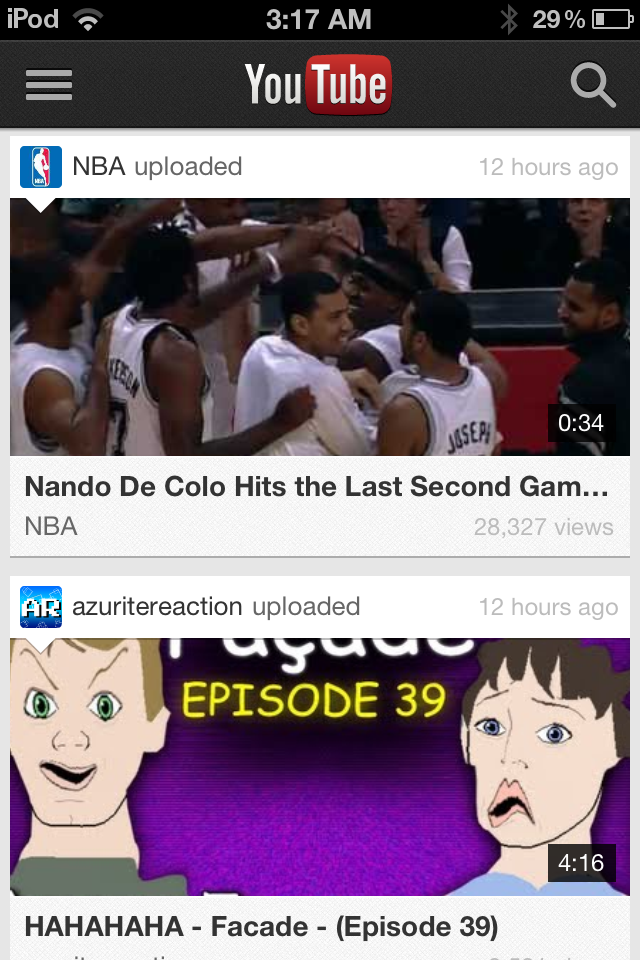
After signing in with your Google account, you'll see typical Google. Very minimalistic, with a simple list of videos from your subscription box which sport huge icons along with a search button and sidebar. That's pretty much all there is. When watching a video, you can now view a video while reading the comments or description. Turning your device automatically hides the description and puts you in full screen mode. It works pretty much exactly how you expect, and in this regard, Google has done a great job.

New YouTube App Subscriptions
Old YouTube App Subscriptions
New YouTube App Video
Old YouTube App Video (Hint: You can't
watch a video and read the
description at the same time


Performance

One thing that really bothered me to no end with Apple's Youtube app was that no matter how bad my connection speed was (and it's notoriously bad in my area), it insisted on playing the high quality video wherever possible. This meant that I couldn't watch a video without it constantly buffering, frustrating me to the point of giving up. Thankfully, Google's new YouTube app knows better than to download more than it can handle, and uses standard quality whenever connection speeds are slow.

Long way to go

Unfortunately, after the first few weeks, letting the excitement of the new app settle down, I've come to realize that all that praise ends there. Google has a long way to go with their YouTube app to be really killer. What about annotations? Back in 2007 when the original YouTube app was made, there were no annotations, and its understandable that they were never included back then. But there are a lot of YouTubers nowadays who make really high quality videos now and many like to include links in their videos for easy access. To those on mobile devices, there's absolutely no ways of seeing annotations. It's really a major let down for the YouTube addicted like myself.

Usability could also be improved as well. Categories are stored underneath subscriptions in the side bar. That's a huge mind blank by Google. What if I have 300 subscriptions? I'm going to scroll forever every time I want to choose a category. And those video icons. I initially thought I'd like the size, but they take up literally half the screen. That's not really surprising, because their desktop YouTube page is notorious for being very unorganized.

Conclusion

Don't confuse the fact that I spent half this review ranting about the new YouTube app. It works just fine and watching YouTube videos works just perfectly. It's just that YouTube has been around for the entire life of the iPhone, it's a little frustrating that their isn't a way of watching YouTube videos on a mobile device that feels like a pleasurable experience. But it's exactly what you expect, and it's definitely hands down better than Apple's five year old app. But personally, I'm going to stick with the mobile web app.

Sunday, 7 October 2012

Ice Cream Sandwich: A Delicious Update


Google's Android mobile Operating System has seen overwhelming popularity over the past 5 years; so much so that it has rivalled and surpassed Apple's iOS in terms of market share. There are thousands of analysts and reporters speculating on the reasons behind this, all with vastly different opinions on the matter. Personally, I believe it comes down to one pivotal aspect, which has been with Android since before it's time with Google: freedom. Unfortunately, as we all know; freedom comes with a price (perhaps not in monetary value, as is the case with many Android devices). 

Whenever you hear someone bragging about how Android is so (so, so much) better than iOS, their fundamental argument comes down to that one 7 letter word. Of course, it's a good thing to have complete control of your own device, but as I said before, there are some consequences. 

With one of Google's most recent versions of Android, they aim to keep the soul of what Android is at the forefront of their development. The OS itself seems very stable, looks amazing, and something that always draws me to a particular product, the Google Play Store is very well designed and implemented into the OS (besides some incompatibilities).

What I Like:

As Google always said with ICS, it was designed to make the most of tablets' larger screens and sometimes more processing power. I've been running ICS on my Acer Iconia for about 3 months now, and I am impressed: it's a big update from what came pre-installed on the device. 

Google has opted for a very Microsoft-esque look and feel; sharp edges, solid block colours, and a system that appears to be geared toward those who like to have complete control over the system. 

Folders on the home screen are a welcome addition. They allow the user to drag one icon on top of another to create a folder with those two - or more - apps. It's very easy and makes any home screen look much neater. This - in my opinion - is one of those small additions that makes all the difference when purchasing a device new, or upgrading older devices. 

Many of Android's built in apps have been redesigned to make them easier to use while implementing a better visual design. Contacts (or People, as it's now called) focuses more on the person them self, rather than a never-ending list of names. 
People
Favorites within People
Communicating with each contact is easier than ever: with links to phone numbers, email addresses, social networks, and other contact methods all housed within their contact card and linking to apps respective with those links. 


Another new (or updated) feature of ICS is the Camera. The new Camera app makes it much easier to point and shoot; which is arguably the main reason people have camera phones/tablets. The new panorama feature stitches amazing panoramas in seconds in surprisingly good quality. 
The new Camera app
Something that I really admire Google for implementing is the new data controls and monitoring displays housed in Settings. With a few taps, a user can easily see the amount of processing power being used on particular processes, how much memory (RAM and SSD) is in use and where, and (probably my favourite part) which apps are using data connections (both 3G and WiFi) and how much data they are consuming. 


Data usage charts and statistics
The screen above shows the user exactly how much data is being used by any app installed (including service apps), and displays the data in an easy to understand chart. For a user who has a low data cap or is just very conscious about how much data they are using, this is a fantastic addition. 

What I Don't Like:
One of Google's own apps suffers
from incompatibility
One problem that I think Android and Google will always have is incompatibilities. This is one of the main reasons I prefer iOS to Android. There's been many times where I've found a fantastic app on my Mac and want to install it on the device, only to find that it's incompatible. The reason I say Google will always have this problem is very simple: there are hundreds, if not thousands, of devices running Android, all with different specifications and different software tweaks that don't allow an app to run because of a likely trivial problem. ICS does attempt to battle this issue, however it seems to be too little too late: apps I attempted to install pre-ICS still refuse to even allow me to install them after upgrading to ICS. 

Another issue that stems from the incompatibility of software and hardware is the rollout of ICS to the thousands of vendors and providers. ICS has still not been made available by Acer Australia, and (after over a year) it should be assumed that the necessary modifications have been made to enable ICS to run on each of the providers devices: unfortunately, for many, that assumption cannot be made. Again, Google has attempted to prevent this with ICS, but it seems that their efforts have gone largely ignored. 

Overall, ICS is a great update to an operating system that has always been about the user and the users' unquestioned control over their device. Like anything with such a level of accessibility and freedom, there are some consequences that have the potential to make for serious problems within the operating system itself.